Build 43 · Performance & graphics settings
Beta 43: Graphics for Your Machine
A lighter first shift, with more control over every frame.
Beta 43 is available for Windows, Linux and macOS. This update focuses on rendering cost and graphics settings, following reports of frame-rate drops on a MacBook Air M2.
Settings that start with your machine
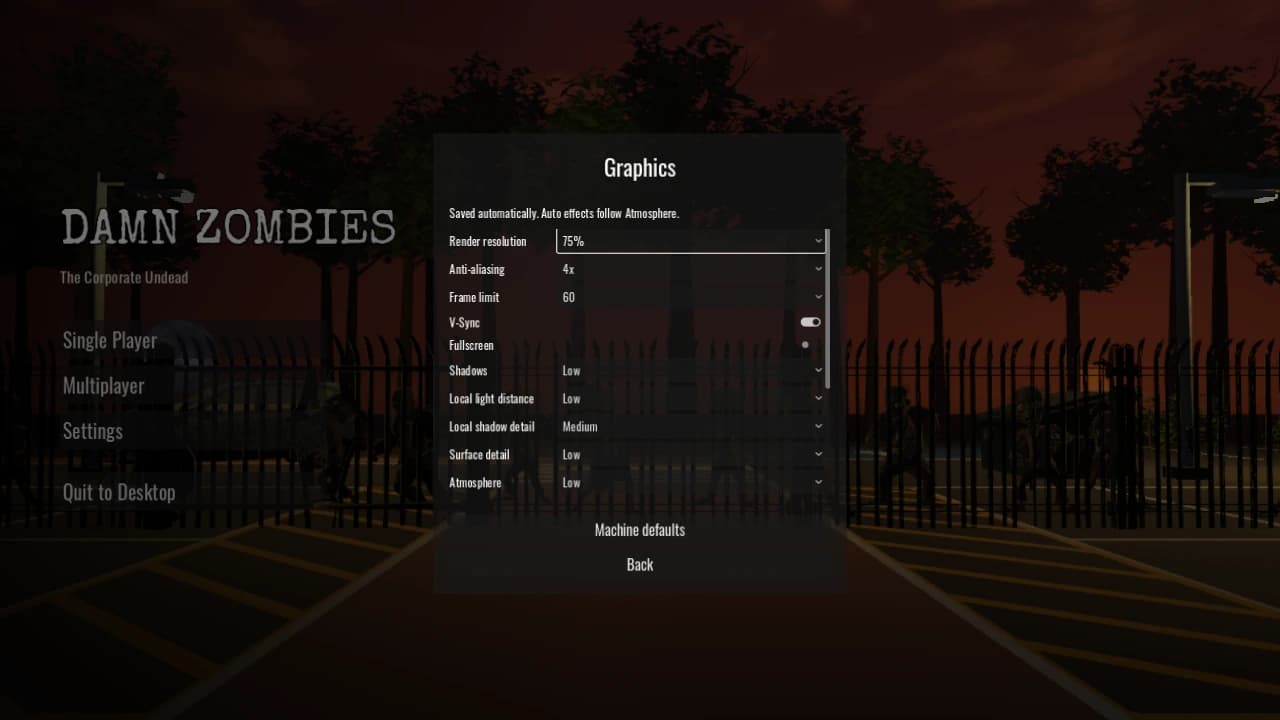
On a fresh install, opening the main menu chooses and saves a graphics starting point from your GPU. Base Apple Silicon and other integrated or unrecognised GPUs start with Power saving: 75% render resolution, FXAA, shorter light and draw distances, lower surface detail, glow and ground mist off, and a 60 FPS cap. Discrete GPUs and Apple Pro, Max and Ultra GPUs start with Balanced settings.
Every change saves automatically. Returning to the menu keeps your choices. Existing installations keep their saved options; only newly added options receive machine defaults. To try the complete new setup on an existing install, choose Settings → Graphics → Machine defaults. This resets graphics while preserving sound, controls and window mode.
Tune the expensive parts
- Render resolution from 50% to 100%, with new 67% and 85% steps. HUD and menus remain sharp.
- Anti-aliasing: Off, FXAA, 2×, 4× or 8×; frame limits of 30, 60, 90, 120 FPS or Unlimited.
- Separate controls for shadow quality, local light distance and local shadow detail.
- Surface detail, dust / steam / beams, ground mist, glow, distance fog and ambient occlusion.
- Zombie detail, draw distance, V-Sync and fullscreen, in a scrolling menu that follows controller and keyboard focus.
Less rendering work around the compound
Distant lamps now leave the renderer after their light has fully faded, reducing unused lighting and shadow work. Nearby lamps retain their shadows and electrical behaviour. Repeated rooftop equipment is drawn in batches, and Low surface detail skips fine grain and bump shading while keeping material colours and baked contact shading.
The investigation reproduced rising rendering cost after moving through the compound with no gameplay zombies present. Local Windows measurements improved with these changes, especially with Power saving settings. The defaults are a GPU-based starting point, not a hardware benchmark or a promise of 60 FPS. Native M2 results still need playtesting.
Mechanics and co-op checks
We corrected outdated checks for the Executive’s strike timing and the Scapegoat’s animation set, and repaired a co-op test setup that put survivors in an inaccessible summon area. Mechanics, combat and single-process co-op checks now pass in both headless and windowed runs. These corrections preserve the existing combat balance and summon rules.
Get Beta 43
Download from the website or itch.io. Windows builds are signed by TSMW Development Ltd. Both downloads use the same beta access key.
If frame rates drop, tell us your machine, resolution, selected graphics options, solo or co-op role, and whether the slowdown starts immediately or after moving around for several minutes.